Digital Paper Design Templates: Your Creative Foundation
When you're working on a project that needs texture, depth, and visual interest, the right background can make everything click. Digital Paper Design Templates give you exactly that foundation—a set of five carefully crafted papers that work across so many different applications it's almost surprising. These aren't generic backgrounds you'd find buried in some free download site. They're designed with intention, ready to elevate whatever you're building.
What Makes These Digital Papers Stand Out
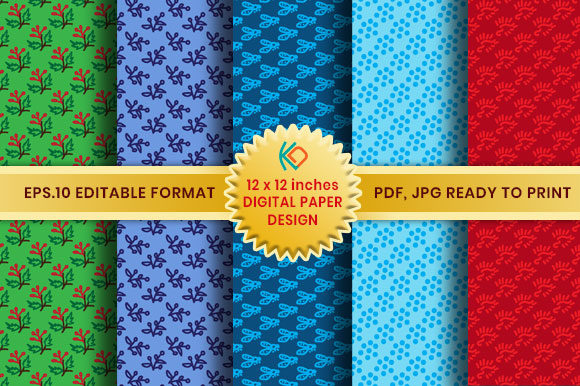
Each paper in this collection carries its own personality while maintaining a cohesive feel across the set. The patterns range from subtle textures that add warmth without competing for attention to bolder designs that can anchor an entire layout. Think of them as versatile building blocks—whether you're creating something elegant and minimal or rich and layered, there's a paper here that fits.
The quality specs matter more than people realize. At 300 DPI and 12 x 12 inches, these files are built for professional output. You can print them at full size for physical projects or scale them down for digital work without losing clarity. The 3600 x 3600 pixel dimensions give you real flexibility, especially when you're working on larger formats or need to crop into specific sections.
What I appreciate about this digital paper pack is the file variety. You get JPG files for straightforward use, PDF files for print-ready workflows, and EPS 10 vector files for situations where you need to edit colors, resize without limits, or customize the pattern entirely. The PNG files with transparent backgrounds open up layering possibilities that flat JPGs simply can't match. Having all these formats in one zip folder means you're not scrambling to convert files or compromising on your workflow.
Where These Papers Actually Work
Let's get practical about applications, because that's where digital paper design templates prove their worth.
Scrapbooking and Memory-Keeping
Modern scrapbook paper needs to feel current without being trendy to the point of dating your pages. These designs strike that balance. Use them as full-page backgrounds or cut them into mats, borders, and layered elements. The 12 x 12 inch format matches standard scrapbook dimensions, so you can print and use them immediately without resizing headaches.
Wedding and Event Design
Wedding props, table numbers, menu cards, ceremony programs—these papers handle all of it. The patterns work beautifully behind typography-heavy pieces because they add visual texture without creating readability problems. I've seen designers use similar papers for envelope liners, favor box wraps, and photo booth backdrop elements. The consistency across the five designs means you can create a coordinated suite without the papers looking identical.
Web and Digital Backgrounds
For website headers, blog post graphics, social media templates, and email newsletter designs, these papers provide depth that solid colors can't achieve. The PNG transparent versions are particularly useful here—you can layer them over brand colors or photographs to create custom effects. They work especially well for Pinterest graphics, Instagram story backgrounds, and Facebook cover images where visual richness drives engagement.
Packaging and Product Design
Small business owners creating product labels, box designs, tissue paper patterns, or shopping bag prints will find these files ready to go. The EPS vector format is crucial here—it lets you adjust colors to match brand palettes, scale for different product sizes, and maintain crisp edges at any dimension. This kind of flexibility separates premium design assets from basic downloads.
Editorial and Publishing Work
Magazine layouts, book covers, zine interiors, and digital publications all benefit from textured backgrounds. These papers can serve as chapter openers, pull quote backgrounds, or full-spread atmospherics. The print-ready resolution means you can hand files directly to a printer without quality concerns.
Choosing and Using These Papers Effectively
Not every paper works for every project, so here's how to evaluate fit.
Consider Your Content Density
If you're placing text over the background, look for the papers with subtler patterns and lower contrast. Busy, high-contrast designs work beautifully as standalone elements or behind simple graphics, but they'll fight with body copy. This is basic visual hierarchy, but it's worth stating because I see this mistake constantly in real-world designs.
Test Your Color Relationships
Before committing to a paper for a project, drop your brand colors or text elements on top and squint at the screen. Can you still read everything clearly? Does the background support or compete with your foreground content? The EPS files make this process easier since you can adjust the paper's color palette to complement your specific project.
Think About Consistency Across Pieces
If you're creating a series—say, a set of social media graphics or a collection of printed materials—using papers from the same set ensures visual cohesion. The five designs in this pack were created to work together, so mixing them across a project creates variety without chaos. That consistency directly impacts how professional and intentional your work looks.
Layer Strategically
The transparent PNG files let you stack papers, blend them with photographs, or create custom color washes by layering them over solid fills. Experiment with opacity levels and blend modes in your design software. You can generate dozens of unique variations from just these five base designs.
Match the Mood
Each paper has its own energy—some feel warm and organic, others lean geometric or structured. Before selecting a paper, define the emotional tone of your project. A cozy bakery brand needs different textures than a tech startup's pitch deck. These digital paper design templates cover a range of moods, so matching paper personality to project personality creates stronger, more resonant work.
Working With the Included File Formats
Understanding when to use each format saves time and prevents frustration.
- JPG files are your workhorse format. Use them for quick mockups, social media posts, and any situation where you need a straightforward background image with no transparency.
- PNG files with transparent backgrounds are essential for layering work, composite designs, and projects where you need the paper texture to sit over other elements without a white box around it.
- PDF files handle print workflows cleanly. If you're sending files to a commercial printer or creating print-ready documents, PDFs preserve quality and color accuracy.
- EPS 10 vector files give you full editability. Change colors, modify patterns, resize infinitely, and customize the design to exact specifications. This format is invaluable for brand identity work and professional packaging design.
Making These Papers Part of Your Design Process
The best design assets become part of your regular workflow rather than sitting unused in a folder. Keep these papers accessible in your project templates library. When you're starting a new piece—whether it's a client project, a personal craft, or marketing material for your business—pull up the set and see which design complements your direction.
Over time, you'll develop instincts about which textures pair well with different font styles and layout approaches. Serif typefaces often pair beautifully with organic, textured backgrounds, while clean sans serif fonts can handle busier patterns without losing legibility. Script and handwritten fonts typically need simpler backgrounds to remain readable.
These digital paper design templates aren't just decorative elements—they're foundational design assets that support your creative work across multiple contexts and platforms. Having high-quality, versatile papers ready to use means you spend less time searching for the right background and more time actually designing.